Deploy a Next.js App with Pull Request Previews
Deploy a Next.js app from GitHub, create an isolated pull-request preview, and verify the result before the production branch changes.
Companion GitHub repositoryCompanion Next.js PR preview starterTylorMayfield/digitalocean-nextjs-pr-previewsView on GitHubWhat this deployment path proves
A pull-request preview gives reviewers a deployed URL for one proposed change before it lands on the production branch. It does not make a change safe by itself: tests, code review, migrations, access controls, and production monitoring still matter. Its value is narrower and practical: someone can inspect the rendered route, sign-in boundary, form behavior, and mobile layout on the exact commit under review.
This guide uses App Platform for a Next.js web service and GitHub Actions for short-lived pull-request previews. Keep preview data disposable. Do not point a preview at production databases, production API keys, live payment credentials, or customer data. A preview is a test environment, not a copy of production.
- A Next.js repository whose build succeeds locally with the lockfile installed.
- A GitHub repository where you can add Actions secrets and pull-request workflows.
- A DigitalOcean team that can create App Platform apps and a narrowly scoped API token.
- A harmless route, such as /health, that returns success without writing data or sending email.
Choose the production boundary before you connect GitHub
Create the production app from the main branch in App Platform first. Select the repository, its source directory if it is in a monorepo, and the web-service component. Confirm the detected build and run commands rather than accepting them on faith. App Platform can build from a Git repository and redeploy when the chosen branch changes; that convenience makes a deliberate branch boundary important.
Add secrets in App Platform’s encrypted runtime-variable interface. In Next.js, only variables prefixed with NEXT_PUBLIC_ are exposed to browser code at build time. Treat every other variable as server-side and never commit a .env file with a real value. Start with only the values the app needs to render a non-sensitive test path.
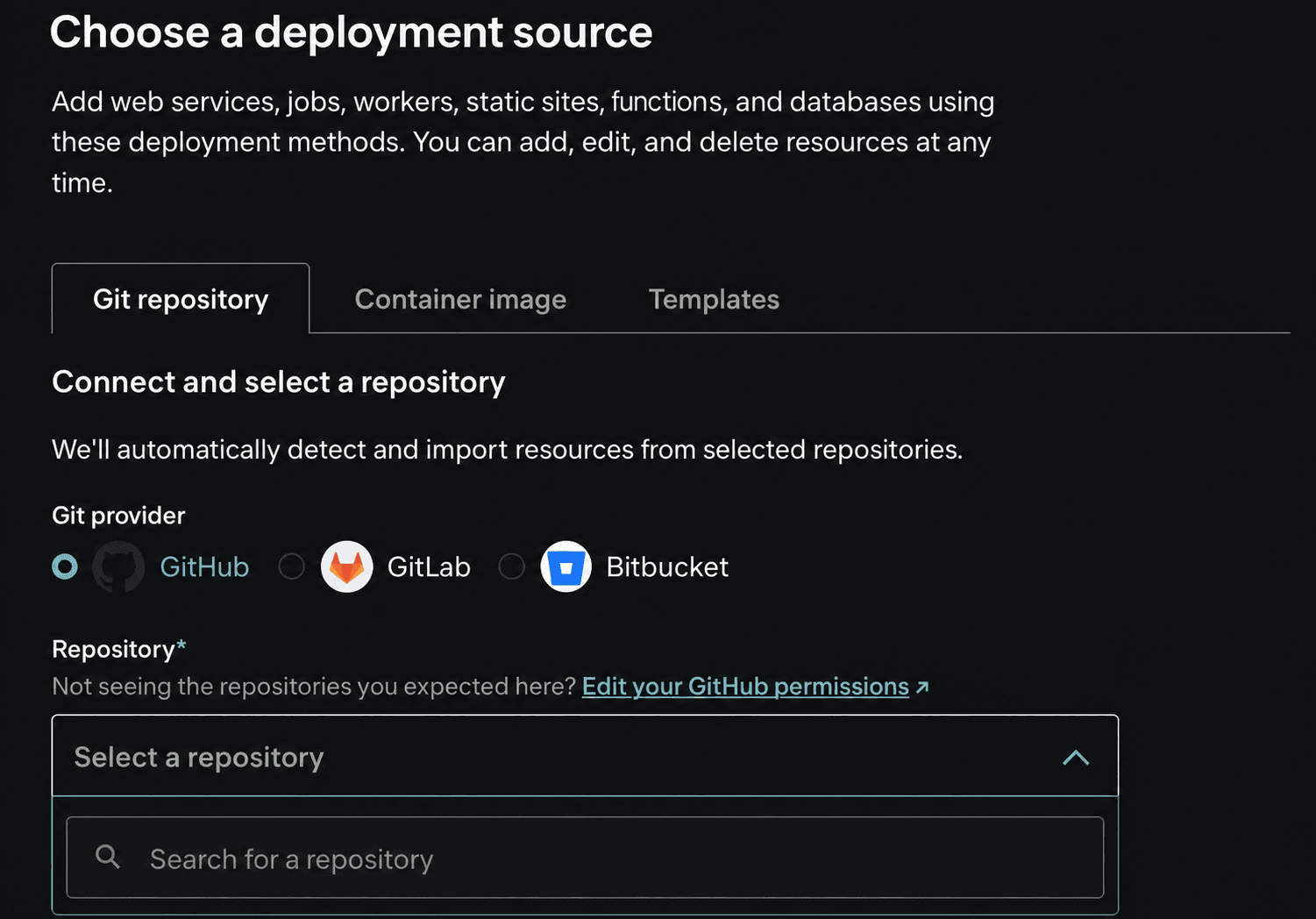
On the source screen, choose Git repository, select GitHub, and choose the repository that contains your Next.js app. If it is missing, use Edit your GitHub permissions before continuing. Selecting a repository only lets App Platform inspect the source; it does not create an app or start a deployment.
- Create an App Platform app from the repository’s main branch and wait for its first deployment to finish.
- Open the component settings and record the service name, HTTP port, build command, run command, and production URL.
- Add encrypted runtime variables through the control panel; keep production-only secrets out of GitHub preview secrets.
- Set a health check to a route that is fast, unauthenticated, and free of side effects. Do not use a route that writes a record merely to prove deployment.
Add a safe health route before automating previews
A health route is a small agreement about what a successful deployment means. For a content app it may only confirm that the server can answer a request. If an app depends on a database or external API, distinguish a liveness check from a deeper readiness check; do not make an external dependency outage look like a bad application deployment without saying so.
The example below deliberately returns no secrets and performs no external request. Put it in the App Router only if your project does not already have an equivalent route. Visit it locally before you configure App Platform.
import { NextResponse } from "next/server";

export function GET() {
  return NextResponse.json({ ok: true });
}
Create one preview per pull request
The companion starter includes the .do/app.yaml base spec, the preview workflow, and the cleanup workflow. DigitalOcean’s GitHub Action can create a unique App Platform app for each pull request and expose its URL as an Action output. Store the DigitalOcean API token as a GitHub Actions secret. Give it only the permissions required for App Platform, rotate it when ownership changes, and never echo it in a workflow or deployment log.
Run previews only for pull requests from the same repository unless you have designed a separate, untrusted-fork workflow. A workflow that runs with privileged secrets against a fork can turn a preview into a credential leak. The preview uses preview-only variables; it should be able to render and exercise a harmless test path without access to production systems.
Before continuing: Use preview-only secrets and keep this workflow restricted to pull requests from the same repository. Do not expose a privileged token to forks.
name: App Platform preview

on:
  pull_request:
    branches: [main]

permissions:
  contents: read
  pull-requests: write

jobs:
  preview:
    if: github.event.pull_request.head.repo.full_name == github.repository
    runs-on: ubuntu-latest
    steps:
      - uses: actions/checkout@v4
      - uses: digitalocean/app_action/deploy@v2
        id: deploy
        with:
          deploy_pr_preview: "true"
          token: ${{ secrets.DIGITALOCEAN_APP_PLATFORM_TOKEN }}
      - uses: actions/github-script@v7
        env:
          PREVIEW_URL: ${{ fromJson(steps.deploy.outputs.app).live_url }}
        with:
          script: |
            github.rest.issues.createComment({
              issue_number: context.issue.number,
              owner: context.repo.owner,
              repo: context.repo.repo,
              body: `Preview: ${process.env.PREVIEW_URL}`
            })
Check the first response
- Expected result
- The pull request receives a preview URL, the changed route renders there, and the preview /health endpoint returns a successful response without writing data.
- Stop if
- Stop if a preview has production credentials or customer data, a fork can receive the token, the health route changes state, or the deployment logs expose a secret.
- Next step
- Review the preview on desktop and mobile, merge only after required checks pass, and confirm the preview cleanup workflow removes the temporary app when the pull request closes.
Verify the preview before you merge
Open the preview link from the pull request and check the changed route at a phone-sized viewport as well as a desktop viewport. Then request the health URL. A successful HTTP response proves that this preview can serve that endpoint; it does not prove every background job, authentication provider, checkout, or production integration works.
If the preview fails, read the linked build and deploy logs before changing configuration. Compare the preview’s environment variables with the minimum documented preview set, not production. Fix the source or preview configuration, push a new commit, and let the existing pull request create a fresh preview. Do not merge because a previous commit happened to have a URL.
curl --fail --silent --show-error "https://YOUR_PREVIEW_HOST/health"Replace before use: YOUR_PREVIEW_HOST
Remove previews and keep production intentional
Add the companion cleanup workflow from DigitalOcean’s preview-deployment documentation so the preview is deleted after the pull request closes. Check its first run in the App Platform dashboard. Leaving previews alive creates confusing URLs, needless cost, and an expanding surface for old dependencies.
Production deployment should remain a separate decision: merge only after the preview result, review, and required checks are satisfactory. After deployment, verify the production health route and the changed user flow. If a release exposes a problem, stop further changes, preserve the evidence, and use the project’s normal recovery procedure rather than treating a preview as a rollback mechanism.